Importing questions through CSV format

An example of a CSV Format importing file
Overview:
This guide will show you how to import multiple-choice questions through a CSV-format importing file.
What to know:
Through this guide, you will learn how to import and export multiple-choice ( 4 choices ) questions with one or two answers from a CSV(Comma-Separated Value) file into the question bank. Note: Multiple-choice questions are currently the only type supported.
Table of Contents
- Download the attached Excel worksheet template
- Input questions and answers information
- Save the file
- Please retain all column names from columns A to H. Even if there is no "Answer 2," do not delete this column name, as it may result in an import failure.
- If the questions and answers are in Chinese, please save the file in CSV UTF-8 format.
Enable the 'Edit mode' icon on the top right of the module page. Then choose 'more' > 'Question bank'.

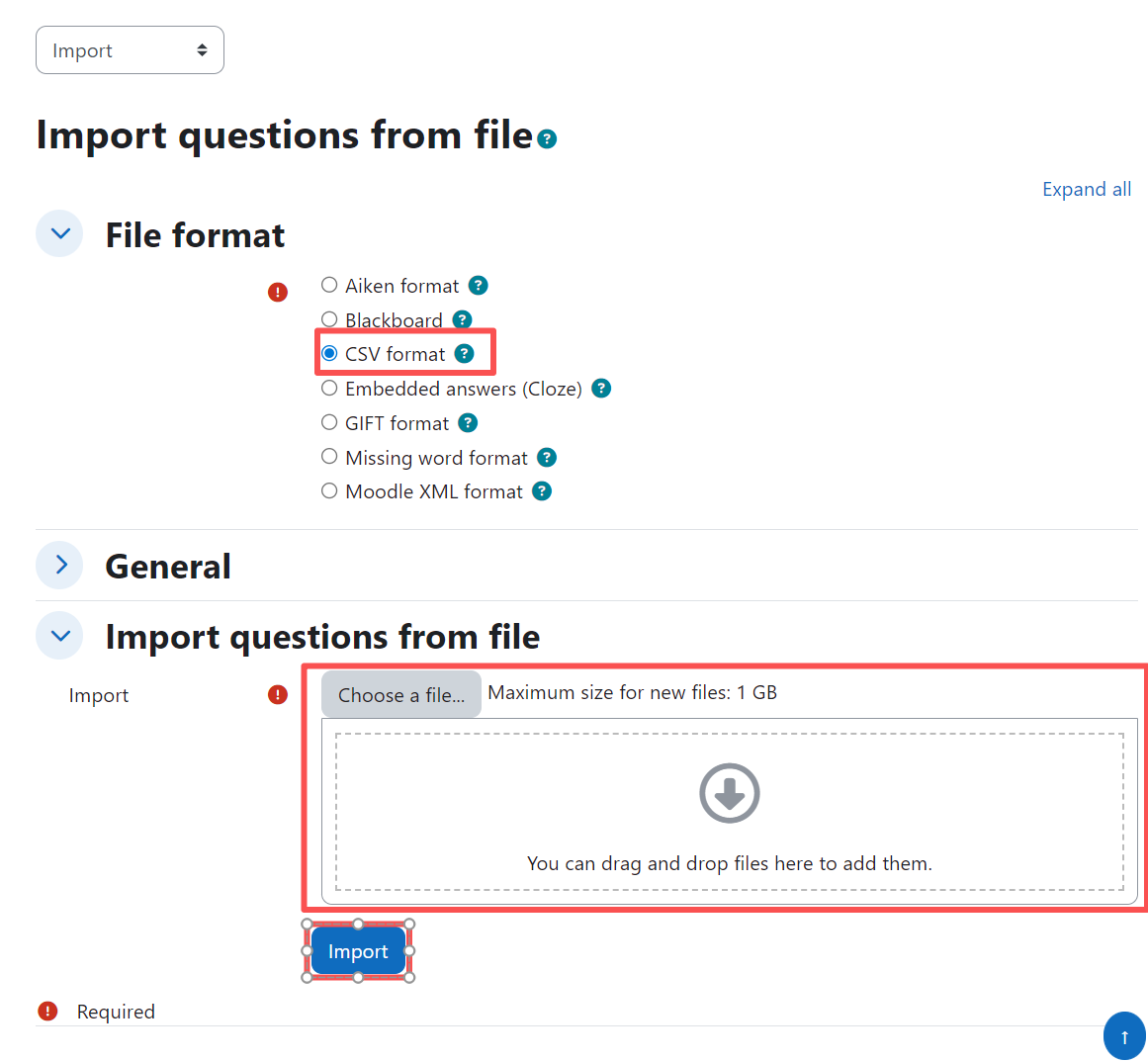
1. Click the 'Import' link.

For the first step of importing a file, choose the file format 'CSV format', and then follow the screenshot below to finish the rest of the steps.